Quick Answer
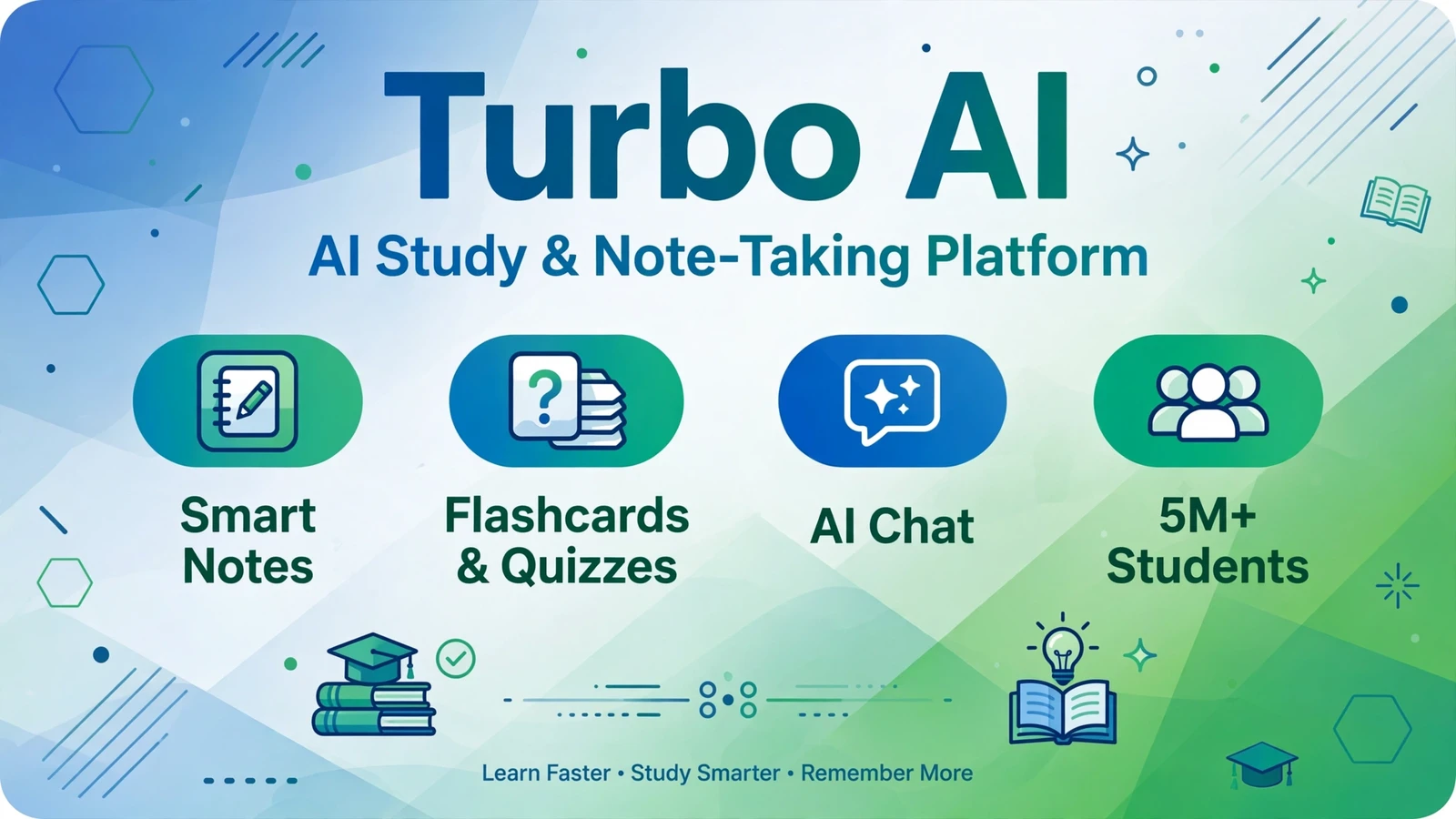
Turbo AI, formerly TurboLearn AI, is an AI-powered note-taking and study platform that turns lectures, PDFs, YouTube videos, and audio into notes, flashcards, quizzes, and podcasts. Used by over 5 million students across 5,000+ colleges, it offers a free plan with limits and a Premium plan at $9.99 per month billed annually or $19.99 monthly.
What Is Turbo AI?
Turbo AI, formerly known as TurboLearn AI, is an AI-powered learning platform that transforms study materials into organized notes and interactive study tools. You upload a recorded lecture, a PDF textbook chapter, a YouTube video link, or live audio, and the AI produces structured notes, flashcards, quizzes, and even podcast-style audio summaries.
The platform is built around a simple idea: students spend too much time on manual note-taking and not enough on actual learning. Turbo AI automates the busywork of organizing information so students can focus on understanding and retention. It has grown to over 5 million users across more than 5,000 colleges.
Beyond students, Turbo AI serves professionals who sit through long meetings and need clean summaries, plus lifelong learners who consume educational YouTube content. The platform positions itself as a human-first AI assistant that keeps the learner in control while clearing away repetitive tasks.
How Does Turbo AI Work?
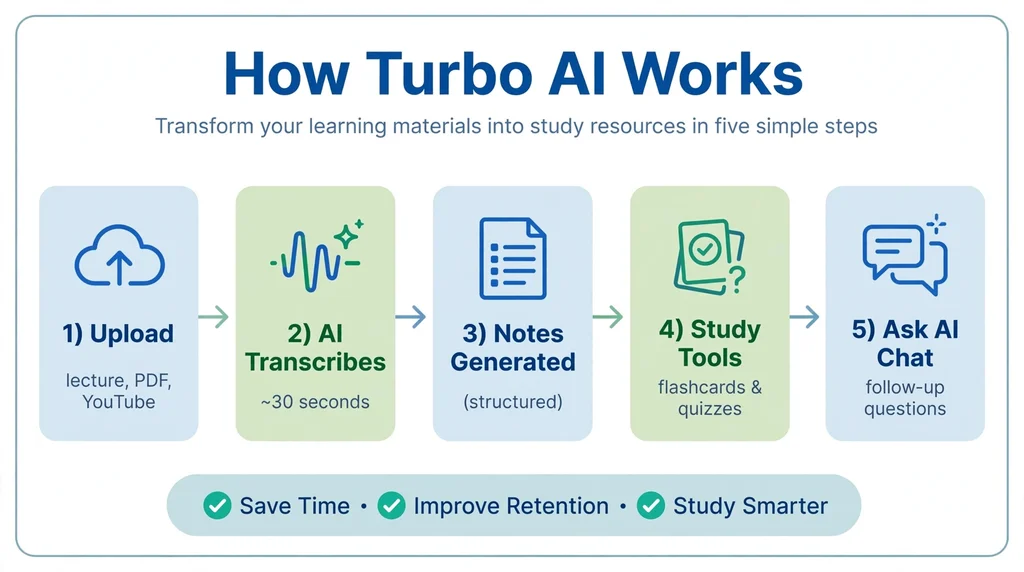
Turbo AI works in a simple five-step process. First, you sign up at turbo.ai or download the iOS or Android app. Second, you upload your source material: a recorded lecture, a PDF document, a YouTube video URL, or live audio from a class. Third, the AI transcribes the audio if needed, analyzes the content, and produces a structured set of notes in roughly 30 seconds.
Fourth, you tap into the auto-generated flashcards or quiz mode to start revising with spaced repetition. Fifth, you can use the built-in AI chat to ask follow-up questions about your material, and the AI answers with references to your uploaded content.
The platform handles STEM subjects particularly well, processing math formulas, chemical equations, and code snippets accurately. Notes are editable in a Google Docs-like editor, and you can collaborate with classmates in real time with AI suggestions that enhance rather than interrupt the workflow.
Key Features of Turbo AI
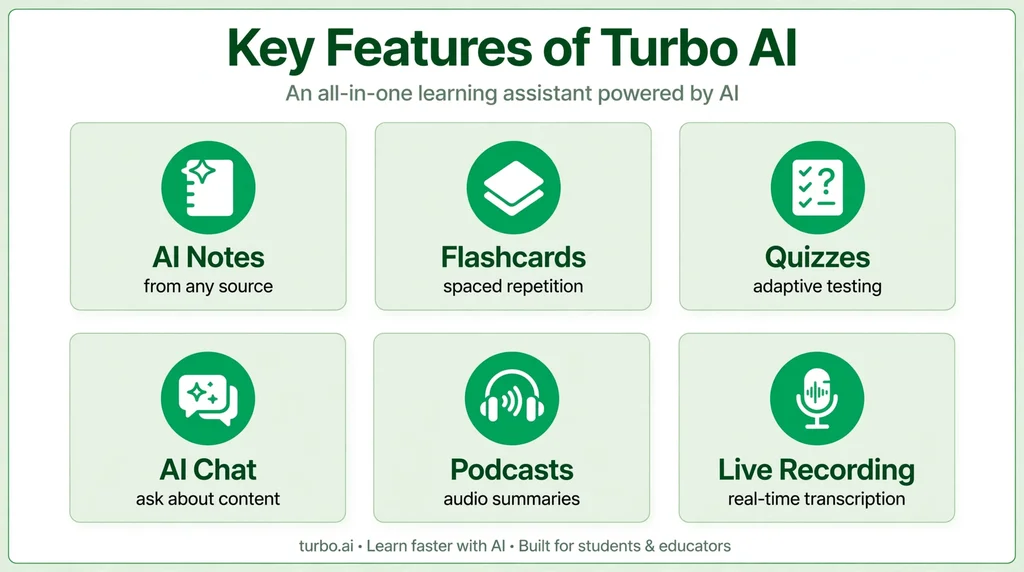
Turbo AI combines note generation with interactive study tools. Here are the features that define the platform.
Also see our guides on Suno AI for more AI tools in this space.
AI Note Generation
Upload PDFs, audio recordings, YouTube links, or record live lectures, and the platform converts them into clean, structured notes. The AI identifies key concepts, organizes them logically, and highlights the most important points automatically.
Flashcards and Quizzes
Every note set automatically generates flashcards for spaced-repetition learning and adaptive quizzes to test your knowledge. The Premium plan offers unlimited and higher-quality quizzes and flashcards compared to the free tier.
AI Chat Assistant
Ask questions about your uploaded content and get answers grounded in your specific materials. The AI chat acts like a study partner that has read everything you uploaded, providing clarifications and connecting ideas across documents.
Podcast Generation
Turn your notes into conversational podcast-style audio for learning on the go. This is ideal for auditory learners and for reviewing material during commutes or workouts.
Live Lecture Recording
Record lectures live with support for different accents and technical terminology. The AI transcribes in real time and builds notes as the lecture progresses.
Collaboration Tools
Share notes with classmates or colleagues and edit together live. The AI provides suggestions, edits, and inline comments like a study partner, with real-time sync across web, mobile, and tablet.
Is Turbo AI Free?
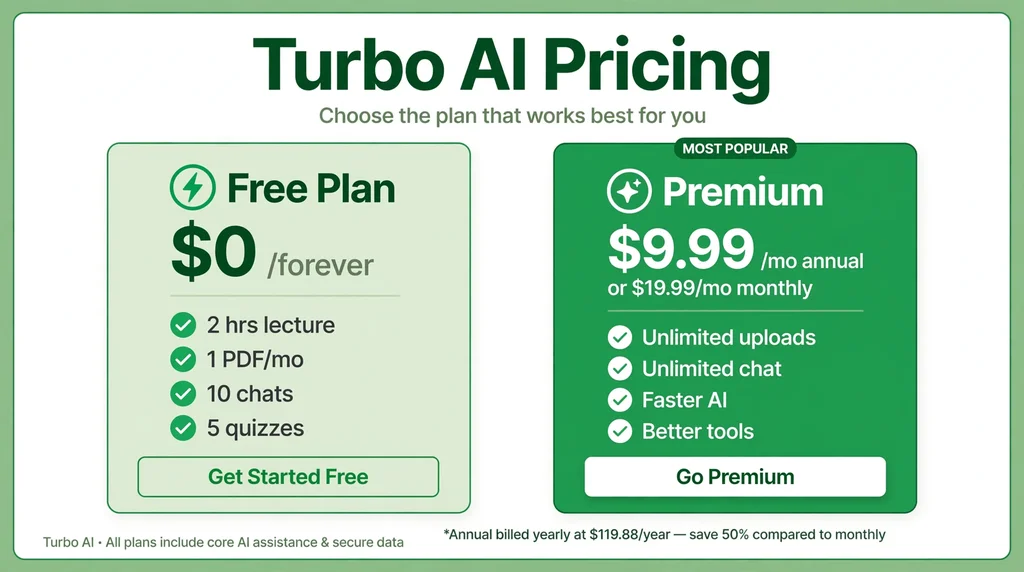
The platform offers a free Starter plan with usage limits. The free plan includes 2 hours of lecture time per month, 5 quiz questions, 1 PDF upload per month, 10 chat messages, and a limited number of flashcards. It is enough to test the core features but not enough for heavy studying.
The Premium plan costs $9.99 per month when billed annually ($119.88 per year) or $19.99 per month when billed monthly. Premium unlocks unlimited PDF uploads, unlimited audio hours, unlimited YouTube videos, unlimited chat conversations and notes, faster AI processing, and better-quality quizzes, flashcards, and podcasts.
For students who study regularly, the annual plan offers the best value at half the monthly price. Verify current pricing at turbo.ai, as plans may change.
How to Use Turbo AI
- Sign up at turbo.ai or download the iOS or Android app. Start with the free plan.
- Upload your material: a lecture recording, PDF, YouTube URL, or start a live recording.
- Wait about 30 seconds while the AI transcribes and generates your note set.
- Review and edit the notes in the built-in editor, adding your own annotations.
- Study with flashcards using spaced repetition, or take an auto-generated quiz.
- Ask the AI chat follow-up questions about anything you do not understand.
Is Turbo AI Safe?
This is a legitimate platform used by students at Harvard, MIT, and other institutions, as well as professionals at Fortune 500 companies. Your uploaded study materials are processed to generate notes and are stored in your account.
As with any cloud service, review the privacy policy to understand how your data is stored and used. The platform is designed for educational content, and there are no significant safety concerns beyond standard data privacy considerations for cloud-based tools.
Turbo AI Pros and Cons
Pros
- Turns lectures, PDFs, and videos into notes in about 30 seconds
- Auto-generated flashcards, quizzes, and podcasts
- AI chat answers questions about your specific materials
- Strong STEM support for formulas and code
- Real-time collaboration with classmates
- Used by 5M+ students across 5,000+ colleges
Cons
- Free plan is very limited for serious studying
- Multi-speaker audio produces less accurate results
- Works best with structured, single-speaker content
- Interface can feel clunky compared to polished alternatives
- Free plan limits are not fully transparent upfront
Turbo AI vs Alternatives
The most common comparison is Turbo AI versus Google NotebookLM. NotebookLM is free and excellent for document-based Q&A, but it lacks the tool’s lecture recording, flashcard generation, and quiz features. Notion AI offers broader productivity features but is not specialized for study workflows. Fireflies AI focuses on meeting transcription for professionals rather than student studying.
Related AI tools you may also want to explore: Perchance AI.
Turbo AI’s advantage is its study-specific pipeline: upload anything, get notes, flashcards, quizzes, and podcasts in one flow. General AI tools require more manual setup to achieve the same study workflow.
Best Turbo AI Alternatives
- Google NotebookLM – Free AI research assistant with excellent document Q&A, but no flashcards or lecture recording.
- Notion AI – Broader productivity AI with notes and databases, less specialized for studying.
- Fireflies AI – Meeting transcription and summaries for professionals.
- Quizlet – The classic flashcard platform with a huge shared deck library.
- Anki – Free, powerful spaced-repetition flashcards for serious memorizers.
Turbo AI for Different Subjects
Turbo AI adapts to different academic disciplines, but its strengths vary by subject type. Understanding where it excels helps you use it more effectively.
STEM Subjects
Science, technology, engineering, and mathematics are Turbo AI’s strongest area. The platform accurately processes mathematical formulas, chemical equations, physics diagrams described in text, and code snippets. For subjects like calculus, organic chemistry, or data structures, the structured note output preserves technical precision that generic summarizers often lose.
Humanities and Social Sciences
For history, literature, psychology, and similar subjects, Turbo AI excels at extracting key arguments, timelines, and thematic connections from long readings. The AI chat is particularly useful here: you can ask it to compare different theories, explain historical causation, or summarize critical perspectives from your uploaded materials.
Professional and Medical Training
Medical, law, and business students deal with dense, high-volume content where Turbo AI’s summarization saves the most time. Case studies, legal briefs, and clinical guidelines become structured notes with key holdings and principles highlighted. The quiz generation is valuable for board exam and bar exam preparation.
Language Learning
While not a dedicated language tool, Turbo AI can process foreign-language lectures and readings, generating vocabulary-focused flashcards. Students studying abroad or taking language courses can upload class recordings and get structured review materials.
Turbo AI Tips for Better Results
Getting the most from Turbo AI requires more than just uploading files. These practical tips improve output quality significantly.
- Upload clean audio. Record in quiet environments with the speaker close to the microphone. Clear audio produces dramatically better transcriptions and notes.
- Use structured sources. Well-organized lectures and textbooks yield better notes than rambling discussions. When possible, upload the syllabus or outline alongside recordings.
- Edit the AI notes. Treat generated notes as a first draft. Adding your own annotations and corrections deepens understanding and creates a personalized study resource.
- Generate quizzes early. Do not wait until exam week. Create quizzes after each lecture to test comprehension while the material is fresh.
- Ask specific chat questions. Instead of “explain this chapter,” ask “what are the three causes of the event described on page 12?” Specific questions get better answers.
- Combine with active recall. Use the flashcards daily with spaced repetition rather than re-reading notes passively. Active recall is proven more effective for long-term retention.
Turbo AI Mobile App
Turbo AI offers iOS and Android apps alongside the web platform, with seamless sync across all devices. The mobile app is particularly useful for recording live lectures: you can start a recording on your phone, and the notes appear on your laptop by the time class ends.
Flashcard review on mobile is ideal for spare moments between classes or during commutes. The podcast feature also shines on mobile, turning your notes into audio for hands-free review. A desktop application is reportedly in development, which will add offline capabilities for users who study without reliable internet.
Turbo AI vs NotebookLM: Detailed Comparison
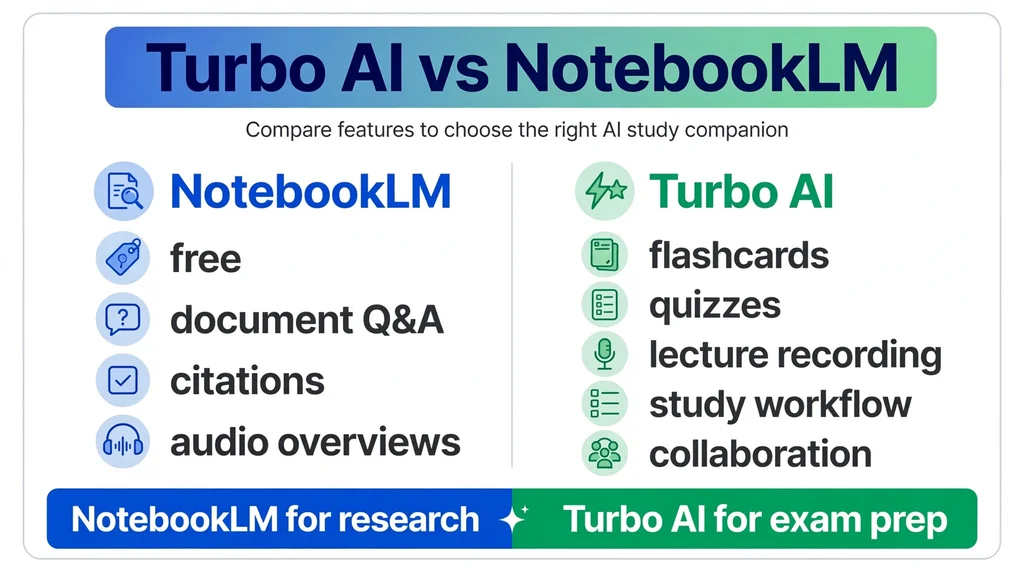
Google NotebookLM is the most frequent alternative students consider, so a detailed comparison is worthwhile. Both tools process documents and answer questions, but they serve different primary needs.
Where NotebookLM Wins
NotebookLM is completely free with generous limits, making it the budget champion. Its document-grounded answers include precise citations to source pages, which is excellent for research verification. The Audio Overview feature generates engaging podcast-style discussions of your documents. For pure research and document Q&A, it is hard to beat at its price of zero.
Where Turbo AI Wins
Turbo AI offers a complete study workflow that NotebookLM lacks. Lecture recording with transcription, auto-generated flashcards with spaced repetition, adaptive quizzes, and a purpose-built study interface give the tool a clear edge for exam preparation. The mobile app with offline-style review and the collaboration features for group study further differentiate it.
Which Should You Choose?
Choose NotebookLM if you need free document analysis and research assistance. Choose Turbo AI if you want an end-to-end study system with flashcards, quizzes, and lecture processing. Many students use both: NotebookLM for research projects and the tool for exam preparation.
Getting Started with Turbo AI Free Plan
If you are new to Turbo AI, the free plan is the right starting point. Here is how to make the most of its limited allowances while deciding whether Premium is worth it for you.
Start with your most challenging subject. Upload one PDF chapter or a single lecture recording and review the generated notes carefully. Pay attention to how well the AI captures key concepts versus how much editing you need to do. This single test tells you more than any review about whether the tool fits your learning style.
Use your 10 monthly chat messages strategically. Instead of casual questions, ask about the concepts you find most confusing. Each well-crafted question can unlock understanding that saves hours of re-reading. Save your 5 quiz questions for self-testing after you have reviewed the notes, not before.
Track how quickly you hit the limits. If you exhaust the 2 hours of lecture time in the first week of the month, you are a strong candidate for Premium. If the free allowances last you the whole month, you may not need to upgrade at all. The free plan is essentially a diagnostic tool for your own usage patterns.
Who Should Use Turbo AI?
Turbo AI is built for university students who attend lectures and revise from PDFs or recordings, professionals who sit through long meetings and need clean summaries, and lifelong learners who consume educational YouTube content. It is the right tool when you want to skip manual note-taking and have AI extract the key information.
It works best with single-speaker, structured content like a clear lecture or textbook chapter. If your primary content is multi-speaker discussions or noisy group recordings, expect weaker results. Casual learners who study infrequently may find the free plan sufficient.
Frequently Asked Questions About Turbo AI
Is Turbo AI the same as TurboLearn AI?
Yes, Turbo AI is the rebranded name for TurboLearn AI. It is the same platform with the same features, now operating under the shorter Turbo brand at turbo.ai.
How much does Turbo AI cost?
Turbo AI has a free plan with limits and a Premium plan at $9.99 per month billed annually or $19.99 per month billed monthly. Premium includes unlimited uploads, unlimited chat, faster AI processing, and better study tools.
What can I upload to Turbo AI?
You can upload PDFs, audio recordings, YouTube video URLs, and live lecture recordings. The AI transcribes audio content and converts everything into structured notes, flashcards, quizzes, and podcasts.
Is Turbo AI good for medical or law students?
Yes, Turbo AI handles dense, technical content well, including the structured materials common in medical and law programs. Its ability to process long PDFs and generate quizzes makes it useful for exam preparation in demanding fields.
Does Turbo AI work for group study?
Yes, Turbo AI supports real-time collaboration. You can share notes with classmates, edit together live, and use AI suggestions during group study sessions.
Can Turbo AI replace attending lectures?
No, Turbo AI is a study aid, not a replacement for learning. It works best when combined with attending classes and engaging with the material. The AI organizes information, but understanding still requires your active effort.
Final Thoughts
Turbo AI earns its place as one of the most popular AI study tools, with 5 million students trusting it to turn lectures and readings into organized study materials. Get started at the official Turbo website with the free plan to test it on your own coursework. You may also want to compare it with Google NotebookLM, a free alternative for document-based research. The free plan is limited, so serious students will need Premium, but the annual price is reasonable for what it delivers. If you spend hours on manual notes, the tool can genuinely give you that time back.