Quick Answer
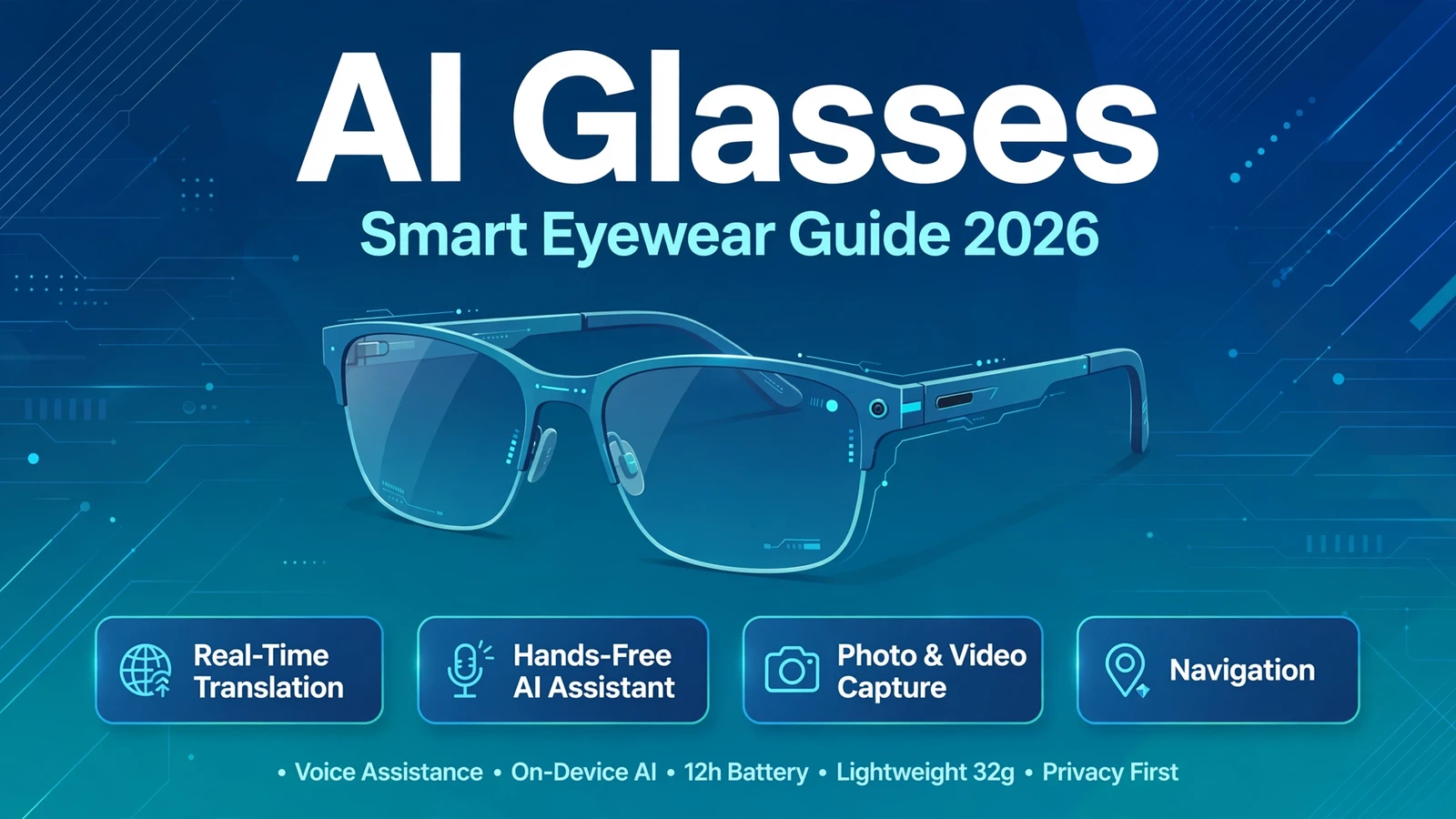
AI glasses are smart eyewear with a built-in AI assistant, camera, speakers, and microphones that let you interact with artificial intelligence hands-free. Leading models in 2026 include Meta Ray-Ban, Rokid Glasses, and Samsung-Google Android XR glasses. They can translate speech in real time, capture photos and video, navigate, answer questions about what you see, and manage calls and messages, all through voice commands.
What Is AI Glasses?
AI glasses are a category of smart eyewear that combine traditional glasses frames with artificial intelligence, cameras, microphones, and speakers. Unlike regular glasses, they connect to an AI assistant that can see what you see, hear what you hear, and respond through voice or visual overlays.
The concept has moved from science fiction to mainstream in 2026. Meta Ray-Ban smart glasses proved the market, shipping millions of units, while new entries from Google, Samsung, Rokid, and others have pushed the technology forward with displays, real-time translation, and multimodal AI that understands both images and speech.
There are two main types of AI glasses on the market today. Audio-first glasses, like Meta Ray-Ban and early Google models, have no display but offer an AI assistant through speakers and microphones built into the frame. Display glasses, like Rokid Glasses and XREAL Project Aura, project information directly into your field of view using waveguide or micro-LED projection technology. The broader category of smart glasses has evolved rapidly from simple notification devices to full AI-powered wearables.
How Does AI Glasses Work?
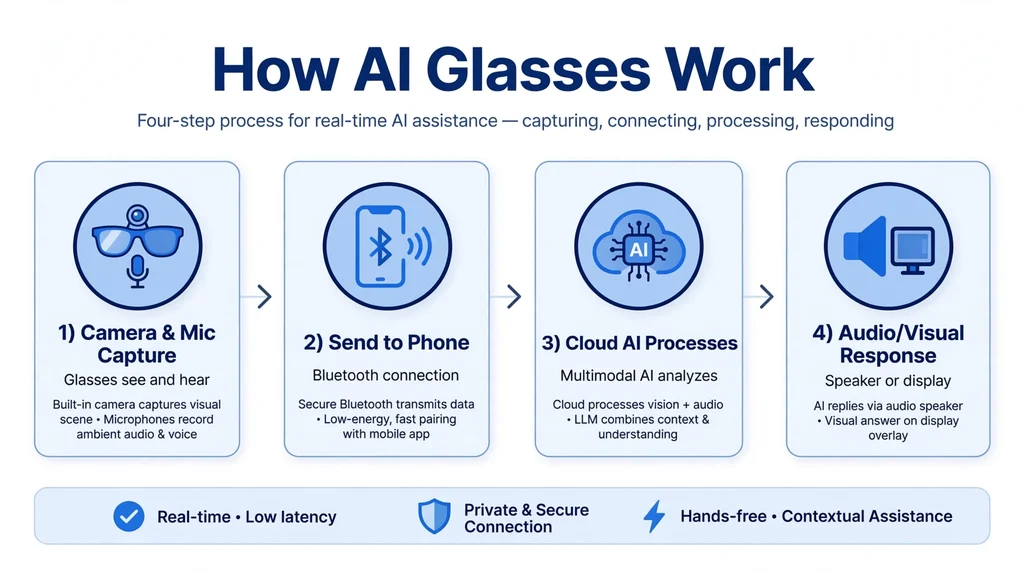
AI glasses work by combining several hardware components with cloud-based artificial intelligence. A small camera captures what you are looking at, microphones pick up your voice and surrounding sounds, and speakers near your ears play audio without blocking your hearing. The glasses pair with your smartphone over Bluetooth, which provides internet connectivity and processing power. Companies like Rokid have pioneered lightweight display systems that make this technology comfortable for all-day wear.
Also see our guides on AI Dungeon for more AI tools in this space.
When you ask a question or give a command, the audio is sent to the AI assistant in the cloud. Multimodal AI models can also analyze the camera feed, so you can ask things like what you are looking at, translate a sign in front of you, or identify an object. The response comes back as spoken audio, or as a visual overlay on display-equipped models.
Most AI glasses use a wake word or a tap on the frame to activate the assistant. For example, Meta glasses respond to “Hey Meta,” while Google-powered glasses use “Hey Google” with Gemini. The glasses stay in a low-power standby mode until activated, which helps preserve battery life throughout the day.
Key Features of AI Glasses
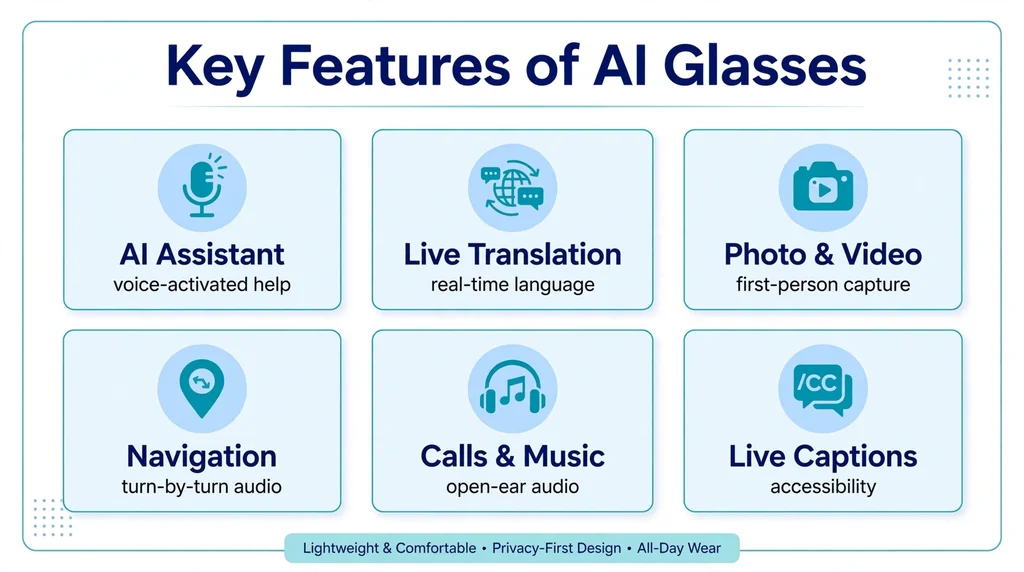
Modern AI glasses pack an impressive range of features into a frame that looks like ordinary eyewear. Here are the capabilities that define the category in 2026.
Hands-Free AI Assistant
The core feature is a voice-activated AI assistant that answers questions, sets reminders, sends messages, and controls smart home devices. Because the camera can see your surroundings, you can ask contextual questions like “What building is this?” or “Translate this menu.”
Real-Time Translation
AI glasses can translate spoken conversations and written text in real time. Google’s Gemini-powered glasses translate speech while matching the original speaker’s tone, and Rokid glasses support translation across dozens of languages. This makes them invaluable for travel and multilingual workplaces.
Photo and Video Capture
A built-in camera lets you capture photos and videos from your point of view with a voice command or button press. Meta Ray-Ban glasses record high-quality video, and Google’s integration with AI photo editing lets you enhance captures with a single voice command.
Navigation and Directions
Turn-by-turn navigation is delivered through audio, so you never need to look at your phone while walking or cycling. Display models can overlay directional arrows in your field of view. The AI knows your location and heading, and can reroute or suggest nearby places mid-journey.
Calls, Messages, and Music
Open-ear speakers let you take calls, listen to messages, and play music without earbuds. Your ears stay open to the environment, which is safer for walking in traffic. Voice commands handle dialing, reading notifications, and controlling playback.
Live Captions and Accessibility
Some models provide live captioning of conversations for hearing-impaired users, displaying spoken words as text. Object recognition can also describe surroundings for visually impaired wearers, helping them navigate unfamiliar environments.
Is AI Glasses Free?
AI glasses are hardware products, so the glasses themselves are never free. Prices in 2026 range from around $299 for entry-level models like Meta Ray-Ban to $1,500 for full XR display glasses like XREAL Project Aura. The AI assistant features are generally included at no extra subscription cost, though some advanced features may require a premium plan.
Meta Ray-Ban smart glasses start at approximately $299, making them the most accessible entry point. Rokid Glasses are positioned in the mid-range with display capabilities. Google’s partner models through Warby Parker and Gentle Monster are expected to launch in fall 2026, with pricing to be announced. Premium AR glasses with full displays remain the most expensive option.
Beyond the purchase price, there are no mandatory subscriptions for core AI features on most models. However, you will need a smartphone with a data plan, since the glasses rely on your phone for connectivity and cloud AI processing.
How to Use AI Glasses
Getting started with AI glasses takes just a few steps. Here is the typical setup process.
- Charge the glasses using the included case or cable until fully charged.
- Download the companion app on your smartphone (Meta View, Rokid app, or Google app depending on the model).
- Pair over Bluetooth by following the in-app instructions. Keep the glasses close to your phone during pairing.
- Complete the setup tutorial to learn the wake word, tap gestures, and voice commands.
- Grant permissions for microphone, camera, location, and contacts so the AI assistant can function fully.
- Start with simple commands like asking the time, sending a message, or taking a photo to get comfortable.
Once set up, daily use is straightforward. Say the wake word followed by your request, or tap the frame to activate the assistant. Common commands include “Take a photo,” “Translate this,” “Navigate home,” “Call Mom,” and “What am I looking at?”
Is AI Glasses Safe?
AI glasses are generally safe to use, but they raise legitimate privacy questions. The camera and microphone are the main concerns, since the glasses can record in public spaces. Most manufacturers address this with a visible LED indicator that lights up whenever the camera is recording, and several regions have laws requiring consent for recording.
From a data perspective, voice queries and images are processed in the cloud, which means your data passes through company servers. Meta, Google, and Rokid all publish privacy policies explaining what is collected and how long it is stored. You can review and delete recordings through the companion app.
Physically, AI glasses are as safe as regular eyewear. They are lightweight, typically under 50 grams, and designed for all-day wear. Display models use low-intensity projection that is certified safe for eyes. As with any connected device, use strong account passwords and keep firmware updated.
AI Glasses Pros and Cons
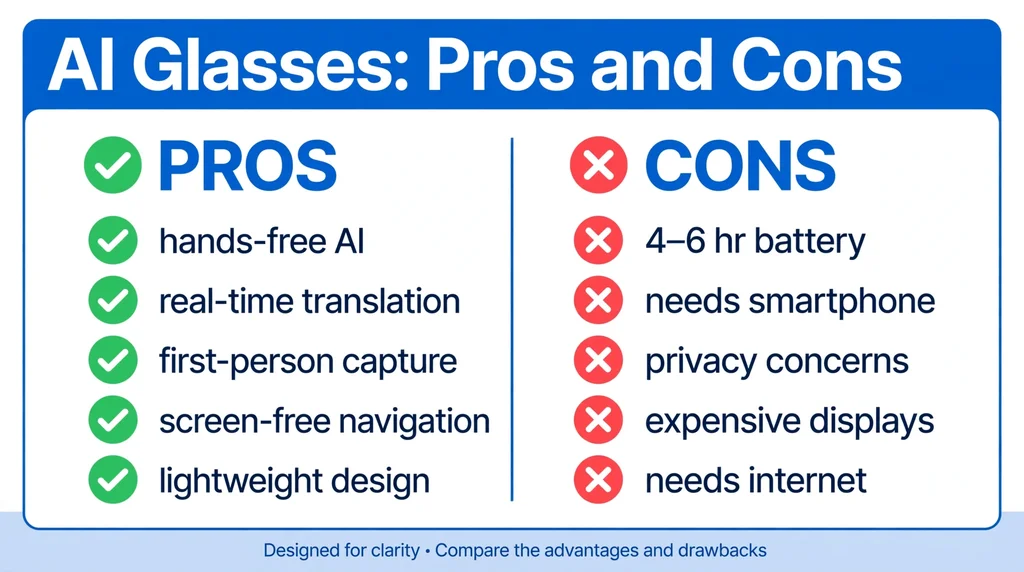
Like any new technology, AI glasses have clear strengths and real limitations. Here is an honest breakdown.
Pros
- Truly hands-free AI assistance throughout the day
- Real-time translation breaks down language barriers
- First-person photo and video capture without holding a phone
- Navigation and notifications without looking at a screen
- Lightweight designs that look like normal glasses
- Accessibility benefits for hearing and visually impaired users
Cons
- Battery life is limited, typically 4 to 6 hours of active use
- Requires a paired smartphone for full functionality
- Privacy concerns around cameras in public spaces
- Display models are expensive, often over $1,000
- AI features depend on internet connectivity
- Social acceptance is still evolving in some settings
AI Glasses vs Alternatives
AI glasses compete with several other wearable and mobile AI form factors. Smartwatches offer notifications and voice assistants on your wrist but lack cameras and visual context. Wireless earbuds provide an audio-only AI experience without any visual input. Your smartphone remains the most capable AI device, with a full screen and powerful processors, but it requires you to pull it out and look down.
Related AI tools you may also want to explore: CrushOn AI.
Compared to these alternatives, AI glasses win on hands-free convenience and contextual awareness. The camera gives the AI eyes on your world, which neither a watch nor earbuds can match. However, phones still offer richer interaction for complex tasks, and earbuds are cheaper and more discreet for audio-only use.
Within the AI glasses category itself, the main choice is between audio-first models and display models. Audio glasses are cheaper, lighter, and have better battery life. Display glasses show visual information but cost more and need charging more often. Choose based on whether you need to see information or just hear it.
Best AI Glasses Alternatives
If AI glasses are not the right fit, these alternatives deliver similar benefits in different form factors.
- Meta Ray-Ban Smart Glasses – The market leader for audio-first AI glasses, starting around $299 with strong camera and Meta AI integration.
- Rokid Glasses – Display-enabled glasses with waveguide projection, real-time translation, and multiple AI assistants including ChatGPT and Gemini.
- Google Android XR Glasses – Launching fall 2026 through Warby Parker and Gentle Monster, powered by Gemini with deep Android integration.
- XREAL Project Aura – Full XR glasses with a 70-degree field of view for immersive AR, priced under $1,500.
- Wireless Earbuds with AI – A cheaper audio-only alternative for voice assistants, calls, and music without any camera.
Best AI Glasses in 2026
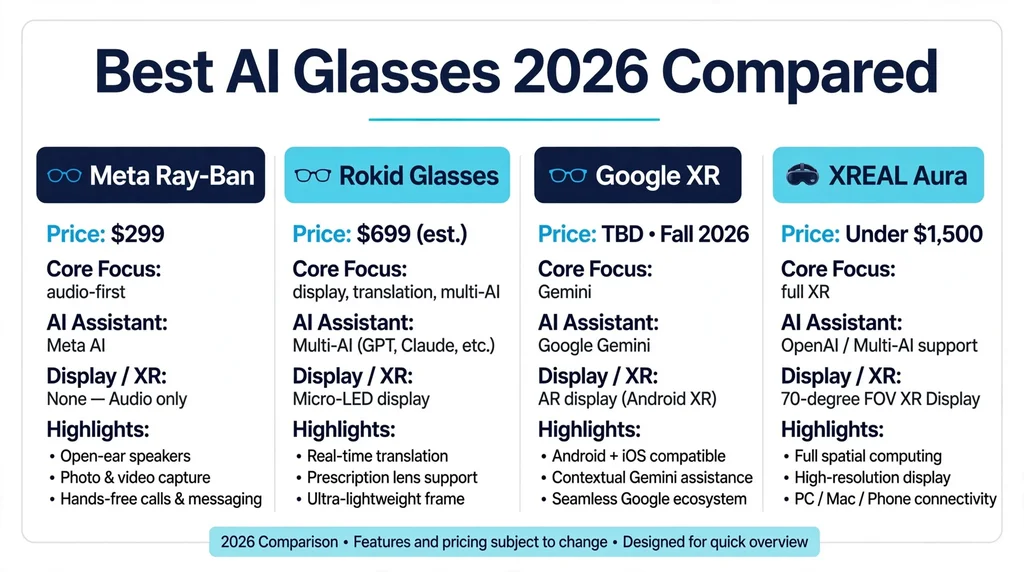
The AI glasses market has matured significantly in 2026, with strong options at every price point. Here is how the leading models compare.
Meta Ray-Ban Smart Glasses
The market leader and best starting point for most people. Starting around $299, Meta Ray-Ban glasses offer an excellent camera, open-ear audio, and deep Meta AI integration. They look like stylish Ray-Ban frames, which helps with social acceptance. The AI can answer questions about what you see, translate text, and identify objects. Battery life is around 4 to 6 hours with typical use, and the charging case provides additional charges throughout the day.
Rokid Glasses
Rokid leads in display-enabled AI glasses, using waveguide projection to show information in your field of view. They support real-time translation, navigation overlays, and teleprompting. Uniquely, Rokid glasses integrate multiple AI assistants including ChatGPT, Google Gemini, DeepSeek, and Qwen on a single device. At just 49 grams, they are as comfortable as regular glasses, and a snap-on lens system supports prescription wearers.
Google Android XR Glasses
Launching in fall 2026 through partners Warby Parker and Gentle Monster, Google’s glasses run Android XR with Gemini as the native assistant. Confirmed features include natural turn-by-turn navigation, hands-free calls and messaging, real-time translation matching the speaker’s tone, AI photo editing with voice commands, and third-party integrations like Uber. They pair with both Android and iOS.
Samsung Galaxy AI Glasses
Developed jointly with Google and unveiled at Google I/O 2026, Samsung’s glasses are designed as a companion to Galaxy smartphones. They offer hands-free voice navigation, personalized location suggestions, pickup order placement, notification summaries, calendar creation, and real-time translation. The deep Galaxy ecosystem integration is the main selling point for Samsung phone owners.
XREAL Project Aura
For users who want full augmented reality, Project Aura brings Android XR to a true XR glasses form factor with a 70-degree field of view. Priced under $1,500 with a Snapdragon-powered compute puck, it targets developers and early adopters who need immersive AR rather than just an AI assistant.
AI Glasses Privacy Concerns Explained
Privacy is the most discussed topic around AI glasses, and it deserves a deeper look. The core concern is straightforward: glasses with cameras and microphones can record people without their knowledge, creating discomfort in social settings, workplaces, and private spaces.
Manufacturers have responded with several safeguards. Every major model includes a visible recording indicator light that cannot be disabled through software. Companion apps let you review and delete all captured photos, videos, and voice recordings. Some models also include a physical camera cover or a hardware kill switch for the microphone.
Legally, the rules vary by location. Many US states require one-party consent for audio recording, while others require all parties to consent. The European Union’s GDPR imposes strict rules on capturing identifiable images of people. Always check local laws before recording in public, and be especially careful in places like restrooms, locker rooms, and private businesses where recording may be prohibited.
For your own data, the main question is what happens to your voice queries and images in the cloud. Meta, Google, and Rokid all state that recordings are used to improve AI models unless you opt out. You can typically disable this in privacy settings. Using strong passwords, enabling two-factor authentication, and keeping firmware updated are basic steps every owner should take.
The Future of AI Glasses
The next few years will bring significant advances. Battery technology is improving, with future models expected to last a full day. Displays are getting brighter, sharper, and more power-efficient, which will bring prices down. On-device AI processing will reduce dependence on the cloud, improving both speed and privacy.
Apple is expected to enter the market in 2027, which will likely accelerate mainstream adoption. Agentic AI capabilities are expanding too: future glasses will not just answer questions but complete multi-step tasks, like ordering food, booking travel, or managing your calendar through conversation alone.
Market analysts expect AI glasses to follow the adoption curve of wireless earbuds: starting as a premium accessory, then becoming a mainstream product within a few years. As prices fall and capabilities grow, AI glasses may eventually replace the smartphone as the primary personal computing device for many daily tasks.
Who Should Use AI Glasses?
AI glasses are ideal for travelers who need real-time translation, commuters who want hands-free navigation and calls, and content creators who capture first-person video. Professionals in fieldwork, logistics, and healthcare benefit from hands-free information access. They are also valuable accessibility tools for people with hearing or vision impairments.
They may not suit everyone. If you are uncomfortable with cameras in social settings, or you need all-day battery without recharging, current models may frustrate you. People who do most of their work at a desk may find a phone or computer more practical. But for anyone who is frequently on the move, AI glasses are becoming genuinely useful rather than just a novelty.
Frequently Asked Questions About AI Glasses
Do AI glasses need a phone to work?
Yes, most AI glasses require a paired smartphone for internet connectivity, cloud AI processing, and app access. The phone handles the heavy computing while the glasses act as the interface. Some display models offer limited standalone features, but full AI capability needs the phone connection.
Can AI glasses record video without people knowing?
Manufacturers include a visible LED light that activates during recording to alert people nearby. Secretly recording others may also violate local privacy laws. Always respect the privacy of people around you and check the regulations in your area before recording in public or private spaces.
How long does the battery last on AI glasses?
Most AI glasses last 4 to 6 hours with typical mixed use, and less with heavy camera or display usage. Charging cases can extend total usage through the day. Battery technology remains the biggest limitation, so plan charging breaks for all-day wear.
Can you wear AI glasses with prescription lenses?
Yes, most major brands support prescription lenses. Meta Ray-Ban offers prescription options, and Rokid uses a snap-on lens system compatible with a wide range of prescriptions. Check with the manufacturer or your optician for your specific model.
Are AI glasses worth it in 2026?
For frequent travelers, commuters, and hands-free workers, AI glasses are increasingly worth the investment as the technology has matured significantly. Real-time translation, contextual AI answers, and first-person capture are genuinely useful. If you mainly work at a desk, a smartphone may still serve you better for now.
What is the difference between AI glasses and AR glasses?
AI glasses focus on the artificial intelligence assistant experience, which may or may not include a visual display. AR glasses specifically overlay digital content onto the real world through a display. Many 2026 products combine both, offering AI assistance with AR visual overlays.
Final Thoughts
AI glasses have grown from an experiment into a practical product category in 2026. With real-time translation, contextual AI assistance, and first-person capture in frames that look like normal eyewear, they solve real problems for travelers, commuters, and hands-free professionals. To explore current models, check out Meta Ray-Ban smart glasses and Rokid glasses, or read the smart glasses overview on Wikipedia for background on the technology. Battery life and privacy questions remain, but the trajectory is clear: the screen is moving from your hand to your face.