Sora gets the headlines, but some of the best AI video value comes from Shanghai. Hailuo AI is an AI video generation platform developed by MiniMax that turns text prompts and still images into short video clips, with its flagship MiniMax H3 model producing up to 15 seconds of footage at 2K resolution with native stereo sound.
We compared it against the big names to find where it genuinely wins. It stands out for realistic physics, strong anime and stylized aesthetics, and very competitive pricing compared to rivals like Sora and Runway. The platform runs on a credit system: new users get free trial credits, and paid plans start at around $10.50 per month for 1,000 credits, removing the watermark and granting commercial usage rights.
In this guide we cover the features, the real pricing math, and how Hailuo AI stacks up against the alternatives.
Quick Answer
Hailuo AI is an AI video generation platform developed by MiniMax, the Shanghai based AI company. It turns text prompts and still images into short video clips, with its flagship MiniMax H3 model producing up to 15 seconds of footage at 2K resolution with native stereo sound. The platform runs on a credit system: new users get free trial credits, and paid plans start at around $10.50 per month for 1,000 credits. Paid plans remove the watermark and grant commercial usage rights. Hailuo AI stands out for realistic physics, strong anime and stylized aesthetics, and very competitive pricing compared to rivals like Sora and Runway.
What Is Hailuo AI?
Hailuo AI is a web based AI video generator created by MiniMax, one of China’s leading artificial intelligence labs. Known in China as HaiLuo ShiPin, which translates roughly to “conch video,” the platform lets anyone create short video clips from a written description or by uploading a still image. You describe the scene, the camera movement, and the mood, and the AI renders a moving clip in seconds.
The platform is built around a family of proprietary video models. The current flagship is MiniMax H3, a general multimodal generator that produces clips of up to 15 seconds at 2K resolution with synchronized stereo audio, meaning dialogue, ambient sound, and effects are generated along with the visuals. Earlier models in the lineup include Hailuo 2.3, which is tuned for realistic physics, body movement, and facial micro expressions, and Hailuo 02, a cinematic model built for polished, film like output at native 1080p.
What makes Hailuo AI interesting in a crowded market is its positioning. While premium competitors charge several dollars per clip, Hailuo AI prices a 10 second 1080p generation at roughly $0.30 worth of credits. Higher tier plans also unlock access to third party models, including Google’s Veo 3.1 and OpenAI’s Sora 2 for video, plus image models such as Nano Banana, Seedream, and Midjourney, turning the platform into a multi model creative suite rather than a single model tool.
MiniMax itself is a significant player in the AI industry. The company listed on the Hong Kong stock exchange and raised HK$4.8 billion, and its international Hailuo service is operated by Nanonoble Pte. Ltd. out of Singapore under Singapore law.
How Does Hailuo AI Work?
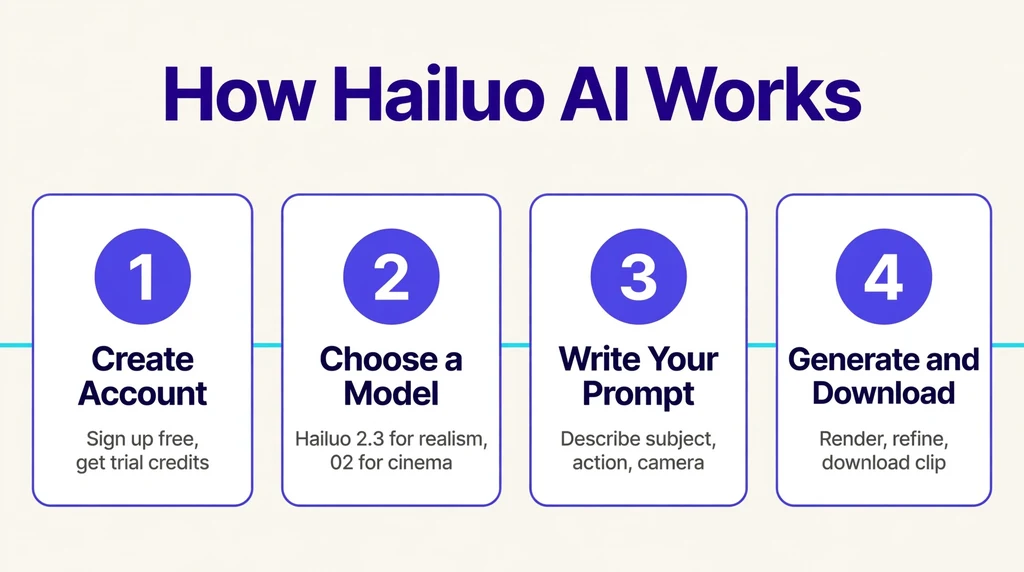
Using Hailuo AI follows a simple pipeline. You start by choosing a model from the lineup, then you provide your input. For text to video, you write a prompt describing the subject, action, setting, lighting, and camera behavior. For image to video, you upload a photo or illustration and optionally add a text prompt that tells the model how the image should move.
Behind the scenes, the selected diffusion based video model interprets your prompt and reference material, then synthesizes a sequence of frames with temporal consistency, meaning objects, characters, and lighting stay coherent from the first frame to the last. The newer models also generate synchronized audio, so a street scene might come with traffic ambience and a dialogue scene with matching lip movement.
Once the clip is generated, you can refine it. The platform offers editing tools that let you adjust the result, extend or restyle footage, and upscale the resolution for a sharper final file. Each generation consumes credits based on the model, resolution, and clip length you choose, typically between 15 and 80 credits per video. Paid plans also support parallel tasks, so you can render multiple clips at once instead of waiting in a queue.
Prompt engineering matters more here than with text tools. Because each generation costs credits, experienced users build a personal prompt formula: subject plus action, then setting, then lighting, then camera move, then style tags. For example, “a fox crossing a snowy forest at dawn, volumetric light, slow tracking shot, cinematic, 35mm film look” will outperform “a fox in snow” every time. Save prompts that work, because reusing proven structures across a project keeps characters and worlds visually consistent from clip to clip.
Negative prompts are equally useful. If hands look wrong or backgrounds warp, adding terms like “blurry, distorted, extra limbs” to a negative field steers the model away from common artifacts. Many creators also generate at lower resolution first to test composition cheaply, then re run the winning prompts at full quality. This two pass approach stretches a credit bundle much further.
Key Features of Hailuo AI
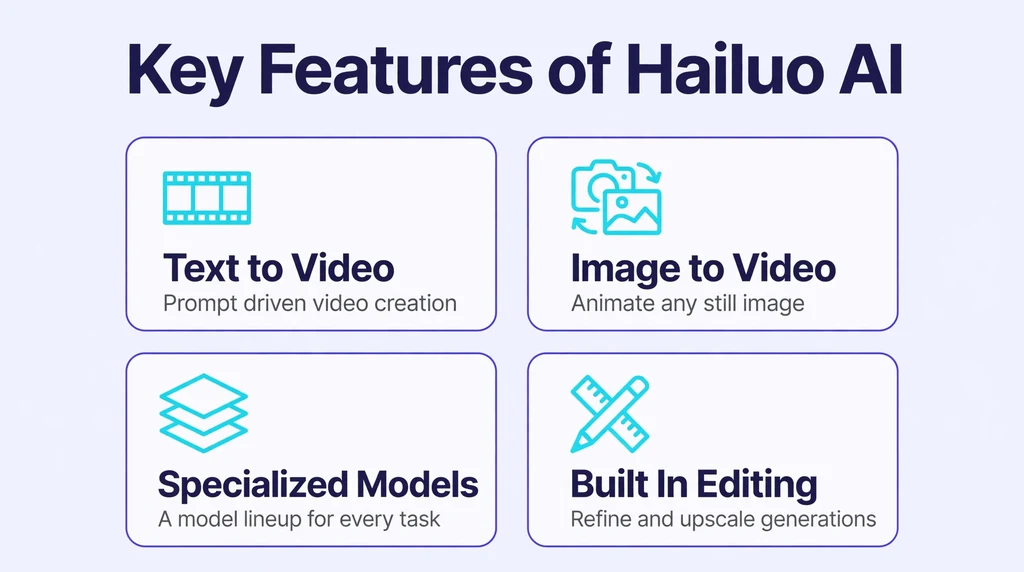
Hailuo AI packs a wide feature set for a platform at its price point. Here are the capabilities that matter most to creators.
Text to Video Generation
The core feature is prompt driven video creation. You describe what you want to see, and the model produces a clip of up to 10 to 15 seconds depending on the model selected. Detailed prompts with camera directions, such as slow push in, aerial pan, or shallow depth of field, tend to produce noticeably better results than vague one line descriptions.
Image to Video Animation
Upload any still image and Hailuo AI will animate it. This is popular for bringing portraits to life, turning product photos into short ads, and creating motion from illustrations or anime stills. You can guide the motion with an additional text prompt, for example asking for a gentle head turn or flowing hair in the wind.
A Lineup of Specialized Models
Rather than forcing one model on every task, Hailuo AI offers several. Hailuo 2.3 leads on physics accuracy, natural body movement, and stylized content like anime, ink wash, and game cinematics. Hailuo 02 targets cinematic quality with its native 1080p architecture. Fast variants cut batch creation costs by up to half for creators generating at volume. The practical rule reviewers suggest is simple: 2.3 for physics and character work, 02 for cinematic polish, and Fast variants when batching.
Built In Editing and Upscaling
Generations do not have to be final. The platform includes tools to edit clips, adjust their look, and upscale resolution so footage holds up on larger screens. This keeps more of the workflow inside one app instead of forcing you to export to a separate video editor for basic touch ups.
Third Party Model Access
On paid plans, Hailuo AI goes beyond its own models. Subscribers can also generate with Google’s Veo 3.1 and OpenAI’s Sora 2 for video, and image models including Nano Banana, Seedream, and Midjourney. This multi model approach means you can compare outputs and pick the best engine for each specific shot without juggling multiple subscriptions.
Commercial Use Rights
Every paid plan removes the watermark and grants commercial usage rights for watermark free downloads, so creators can use generated clips in client work, advertisements, and monetized content. According to the platform’s FAQ, failed generations are not charged, which softens the risk of experimenting with ambitious prompts.
Is Hailuo AI Free?
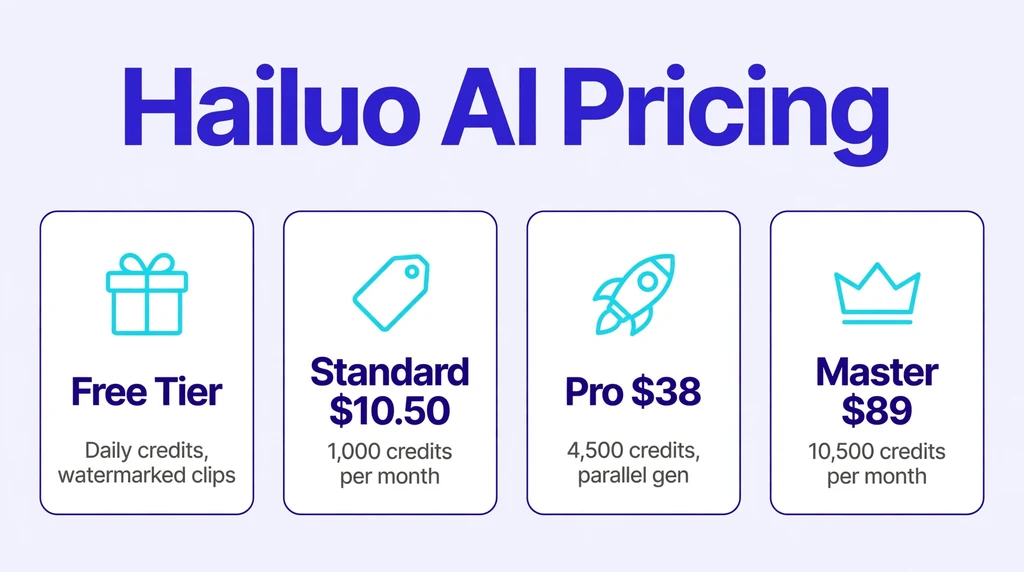
Hailuo AI is not fully free, but it is easy to try without paying. New users receive one time free trial credits that work with Hailuo’s own models, which is enough to test the platform’s style and quality. There is also a free tier that provides daily bonus credits, generally enough for roughly two to three short videos per day at 720p. Free outputs carry a watermark and cannot be used commercially.
For serious use, the platform runs on four paid tiers. Standard costs around $10.50 per month billed monthly, or about $8.40 per month billed yearly, and includes 1,000 credits. Pro costs around $38 monthly for 4,500 credits plus parallel generation. Master is about $89 per month for 10,500 credits. Max, the top tier, runs about $216 monthly for 27,000 credits with unlimited Hailuo 2.0 and 2.3 generations. Credit top ups remain valid for a year, and the company does not offer refunds, so it pays to start small.
Individual videos consume between 15 and 80 credits depending on the model, resolution, and duration. At roughly $0.30 per 10 second 1080p clip, Hailuo AI dramatically undercuts premium competitors, which is a major part of its appeal. Pricing is shown at a discount to list price on the site, and plans can change, so always check the current pricing page before subscribing.
How to Use Hailuo AI
Getting started takes only a few minutes. Follow these steps:
- Visit the official Hailuo AI website and create an account with your email. New accounts receive free trial credits automatically.
- Choose your model. Pick Hailuo 2.3 for realistic motion and character work, Hailuo 02 for cinematic shots, or a Fast variant for quick batch drafts.
- Select text to video or image to video. For text, write a detailed prompt covering subject, action, environment, lighting, and camera movement. For image input, upload your file and add a motion prompt.
- Set your resolution and duration, keeping in mind that higher settings consume more credits per generation.
- Click generate and wait for the render to finish. Review the clip, then use the built in editing or upscaling tools if you want to refine it.
- Download your video. Free tier downloads carry a watermark, while paid plans allow clean, watermark free downloads with commercial rights.
A practical tip: because clips are capped at around 10 to 15 seconds, plan longer projects as a sequence of short shots. Write each shot as its own prompt with consistent character and setting descriptions, then stitch the clips together in any video editor for a longer final piece.
Is Hailuo AI Safe?
Hailuo AI is a legitimate product from an established AI company, and the platform itself is safe to use in the normal sense: it does not install software, and payments go through standard checkout flows. Your prompts and uploads are processed on MiniMax’s servers, so avoid uploading sensitive personal photos or confidential material, just as you would with any cloud AI service.
There are a few caveats worth knowing. The company has faced legal challenges, including a lawsuit from major Hollywood studios over copyrighted characters and an accusation from Anthropic about model training practices. These disputes concern the company’s business, not the safety of your account, but they are part of the full picture.
User sentiment is mixed on the billing side. The platform holds a low rating on Trustpilot, with most negative reviews concerning charges, cancellation difficulty, and the no refund policy. If you subscribe, keep an eye on your renewal date and credit balance. On the content side, generated videos should be labeled as AI made when shared publicly, both as a matter of honesty and because some platforms now require AI content disclosure.
Content moderation is another angle to consider. Like all generative video platforms, Hailuo AI filters certain prompts, particularly around real people, graphic content, and copyrighted characters. Creators working with sensitive topics should test the boundaries early on a free tier rather than discovering limits mid project on a paid plan. The platform’s terms also place responsibility for lawful use on you, so commercial users should keep records of their licenses and generations.
On the account side, use a strong unique password and watch for the renewal date if you subscribe monthly. Because refunds are not offered, the safest pattern is to start with the smallest plan that fits your needs, track how many credits a typical project consumes, and only then consider an annual commitment for the discount.
Hailuo AI Pros and Cons
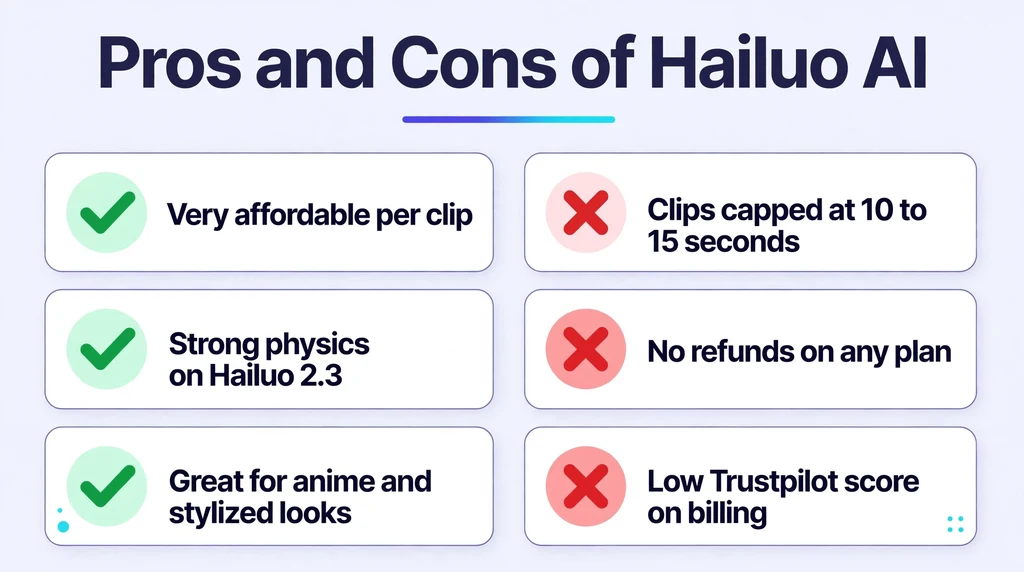
Every tool involves trade offs. Here is an honest summary.
- Very affordable per clip compared to premium rivals
- Strong physics accuracy and natural character motion on Hailuo 2.3
- Excellent for anime, illustration, and stylized aesthetics
- Multiple specialized models plus third party options on paid plans
- Commercial usage rights included with paid subscriptions
- Failed generations are not charged, according to the platform FAQ
- Clips capped at about 10 to 15 seconds, so long form needs stitching
- No refunds offered on any plan
- Low Trustpilot score driven by billing and cancellation complaints
- Credit system punishes heavy experimentation on lower tiers
- Ongoing copyright lawsuits create some long term uncertainty
- Less mature editing toolkit than established rivals like Runway
Hailuo AI vs Alternatives
Compared to OpenAI’s Sora, Hailuo AI is far cheaper and faster, with a 10 second 1080p clip costing roughly $0.30 against about $3.50 for Sora. Sora leads on maximum clip length and cinematic polish, so big budget storytellers may still prefer it, but for rapid iteration Hailuo AI wins on value.
Against Runway, which costs roughly $1.20 per comparable clip, Hailuo AI again wins on price per generation. Runway counters with a more mature editing suite and deeper integration into professional post production workflows, making it the stronger choice for editors who need precision control.
Versus Kling, the comparison is closer. Hailuo AI often leads on physics accuracy and stylized content, while Kling is frequently preferred for realistic human subjects. Many creators keep both in their toolkit and choose per shot.
The broader pattern is clear: Hailuo AI’s sweet spot is fast, affordable, physics accurate generation, with a particular edge in anime and stylized aesthetics. If your priority is maximum realism or the longest possible single clips, the premium alternatives justify their higher prices.
Best Hailuo AI Alternatives
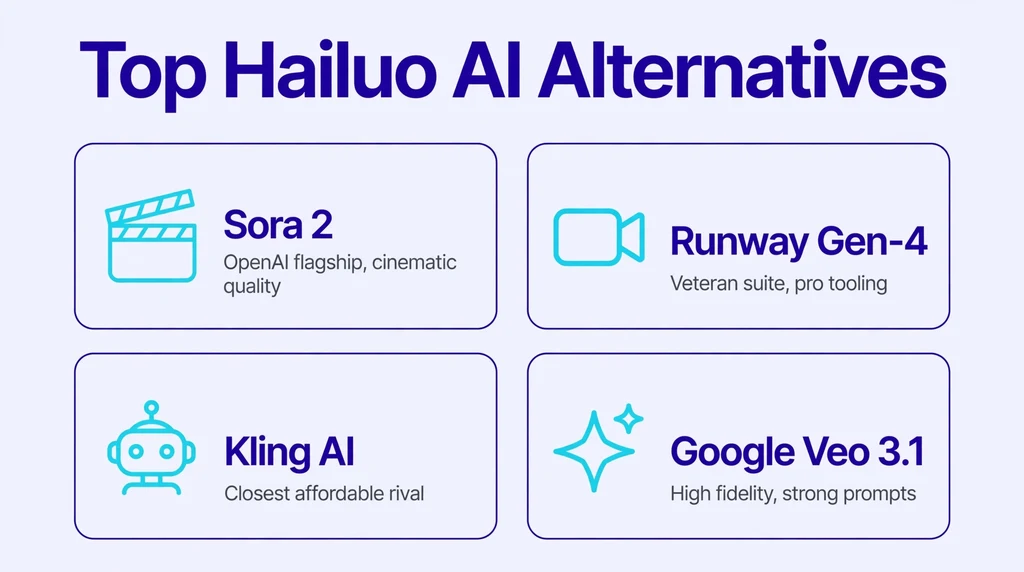
If Hailuo AI does not fit your needs, these are the strongest substitutes.
OpenAI Sora 2
Sora 2 is OpenAI’s flagship video model, known for impressive cinematic quality and longer coherent clips. It costs significantly more per generation than Hailuo AI, but it leads the field in realism and complex scene handling for creators with the budget.
Runway Gen-4
Runway is the veteran of AI video, offering a full creative suite with advanced editing, motion controls, and collaboration features. It is pricier per clip than Hailuo AI, but its tooling is the most mature for professional video workflows.
Kling AI
Developed by Kuaishou, Kling AI is Hailuo AI’s closest rival in the affordable segment. It excels at realistic human subjects and offers competitive pricing, making it the natural alternative for creators who prioritize photoreal people.
Google Veo 3.1
Google’s Veo 3.1 generates high fidelity video with strong prompt adherence and is available inside Hailuo AI’s own paid plans as well as through Google’s products. It is a top pick for creators who want cutting edge quality and already live in Google’s ecosystem.
Pika
Pika focuses on accessible, playful video generation with strong stylization effects. It is beginner friendly and affordable, though its realism lags behind the top tier models.
Luma Dream Machine
Luma’s Dream Machine is known for smooth, dreamlike motion and fast generation. It suits artistic and experimental projects where mood matters more than precise physics.
Who Should Use Hailuo AI?
Hailuo AI is a strong fit for content creators, social media marketers, and indie filmmakers who need a high volume of short clips without a large budget. Anime and illustration artists will appreciate the stylized strengths of Hailuo 2.3. Advertisers producing short spots get commercial rights on paid plans at a fraction of premium tool costs.
It is less ideal for filmmakers needing long continuous takes, since the 10 to 15 second cap means stitching. Professionals who depend on deep editing timelines may prefer Runway’s mature suite. And anyone uncomfortable with the company’s legal disputes or strict no refund policy should weigh those factors before committing to an annual plan.
Educators and trainers are an emerging audience too. Short generated clips can illustrate historical scenes, scientific processes, or abstract concepts in e learning modules far more cheaply than stock footage or custom animation. The commercial license on paid plans covers this use, and the anime friendly styles work well for younger audiences.
If you are on the fence, the free tier answers most questions within a day of experimentation. Generate a few clips in your preferred style, test the prompt control, and check whether the output quality meets your bar. Your own test renders are worth more than any review when deciding whether to subscribe.
Frequently Asked Questions About Hailuo AI
1. What is Hailuo AI used for?
Hailuo AI is used to generate short video clips from text prompts or still images. Common uses include social media content, advertisements, anime style animation, product demos, and concept visualization for films.
2. Is Hailuo AI really free?
There is a free tier with daily bonus credits for a few short watermarked videos per day, plus one time trial credits for new users. Full quality, watermark free, and commercial use require a paid plan starting at around $10.50 per month.
3. Who owns Hailuo AI?
Hailuo AI is developed by MiniMax, a Shanghai based artificial intelligence company. The international service is operated by Nanonoble Pte. Ltd. in Singapore.
4. Can I use Hailuo AI videos commercially?
Yes, but only on paid plans. Paid subscriptions include watermark free downloads with commercial usage rights. Free tier videos carry a watermark and are not licensed for commercial use.
5. How long can Hailuo AI videos be?
Clips are capped at roughly 10 to 15 seconds depending on the model. Longer videos are made by generating multiple clips and stitching them together in a video editor.
Final Thoughts
Hailuo AI earns its place as one of the best value AI video generators available today. Its combination of low per clip costs, strong physics, excellent stylized output, and multi model access on paid plans is hard to match at this price. The credit system, short clip caps, and billing complaints mean you should start with the free tier and upgrade carefully, but for creators who need volume on a budget, it is an easy recommendation.
For an independent review of the platform’s models and pricing, see this detailed Hailuo AI breakdown. To try the tool yourself, visit the official Hailuo AI website.